
PlantUML
参考链接
活动图
行为
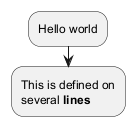
活动标签以: 开始,以; 结束。文本格式可以使用克里奥尔语的维基语法。它们的定义顺序是隐性链接的。
1 | @startuml |
当然,还可以使用别的符号作为开头:
-
-1
2
3
4
5@startuml
- Action 1
- Action 2
- Action 3
@enduml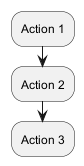
-
* -
一级
1
2
3
4
5@startuml
* Action 1
* Action 2
* Action 3
@enduml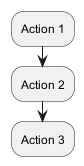
-
多级
1
2
3
4
5
6
7
8
9
10
11@startuml
<style>
element {MinimumWidth 150}
</style>
* Action 1
** Sub-Action 1.1
** Sub-Action 1.2
*** Sub-Action 1.2.1
*** Sub-Action 1.2.2
* Action 2
@enduml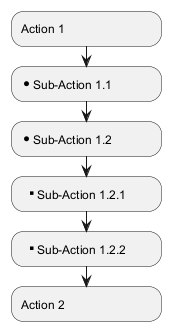
开始/停止/结束
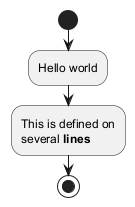
你可以使用start 和stop 关键字来表示一个图的开始和结束 。
1 | @startuml |
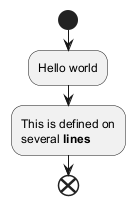
你也可以使用end 关键字。
1 | @startuml |
分支
if-else
你可以使用if,then, break和else 关键词来在你的图表中放入测试。 标签可以用圆括号提供。
有3种语法可供选择。
-
if (...) then (...)1
2
3
4
5
6
7
8
9
10
11
12
13
14@startuml
start
if (Graphviz installed?) then (yes)
:process all\ndiagrams;
else (no)
:process only
__sequence__ and __activity__ diagrams;
endif
stop
@enduml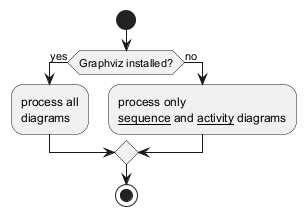
-
if (...) is (...) then1
2
3
4
5
6@startuml
if (color?) is (<color:red>red) then
:print red;
else
:print not red;
@enduml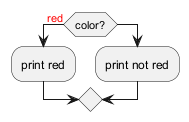
-
if (...) equals (...) then1
2
3
4
5
6@startuml
if (counter?) equals (5) then
:print 5;
else
:print not 5;
@enduml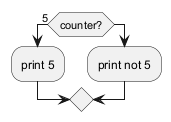
分支可以使用不同的排布方式:
-
水平模式(默认水平模式)
1
2
3
4
5
6
7
8
9
10
11
12
13
14
15
16@startuml
start
if (condition A) then (yes)
:Text 1;
elseif (condition B) then (yes)
:Text 2;
stop
(no) elseif (condition C) then (yes)
:Text 3;
(no) elseif (condition D) then (yes)
:Text 4;
else (nothing)
:Text else;
endif
stop
@enduml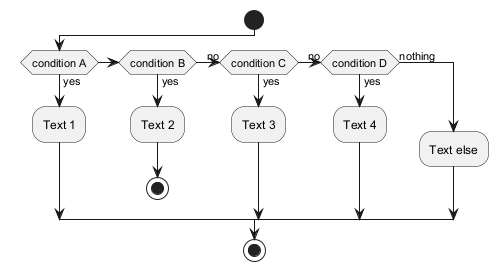
-
垂直模式:你可以使用
!pragma useVerticalIf on命令,让图处于垂直模式。1
2
3
4
5
6
7
8
9
10
11
12
13
14
15
16@startuml
start
if (condition A) then (yes)
:Text 1;
elseif (condition B) then (yes)
:Text 2;
stop
(no) elseif (condition C) then (yes)
:Text 3;
(no) elseif (condition D) then (yes)
:Text 4;
else (nothing)
:Text else;
endif
stop
@enduml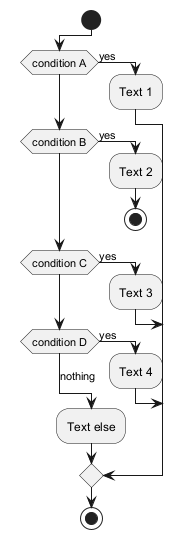
你可以使用-P command-line[命令行]选项来指定pragma。
1 | java -jar plantuml.jar -PuseVerticalIf=on |
switch
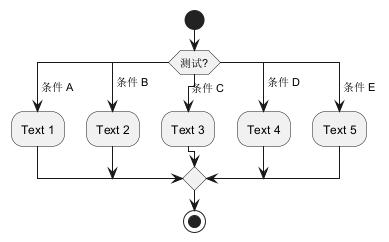
Switch判断可以使用你可以使用 switch, case 和 endswitch 关键词在图表中绘制Switch判断.使用括号表示标注.
1 | @startuml |
终止
你可以在if判断中终止一个行为.
1 | @startuml |

但如果你想在特定行为上停止,你可以使用kill 或 detach关键字:
-
kill1
2
3
4
5
6
7@startuml
if (条件?) then
#pink:错误;
kill
endif
#palegreen:行为;
@enduml
-
detach1
2
3
4
5
6
7@startuml
if (条件?) then
#pink:错误;
detach
endif
#palegreen:行为;
@enduml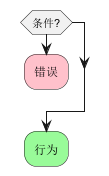
GoTo
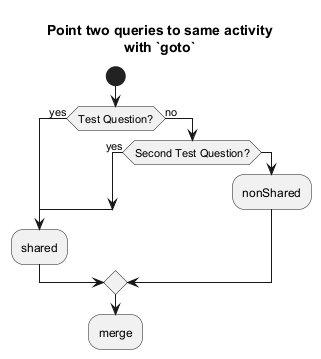
Goto和标签处理 [label, goto]
⚠ 目前只是实验性的 🚧
你可以使用label 和goto 关键词来表示Goto处理,其中:
label <label_name>goto <label_name>
1 | @startuml |
循环
基础循环
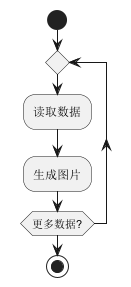
重复循环:你可以使用关键字repeat和repeatwhile进行重复循环。
1 | @startuml |
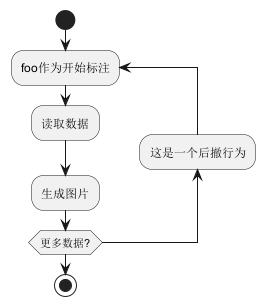
你同样可以使用一个全局行为作为repeat目标, 在返回循环开始时使用backward关键字插入一个全局行为。
1 | @startuml |
跳出
你可以使用 break 关键字跟在循环中的某个行为后面打断循环.
1 | @startuml |
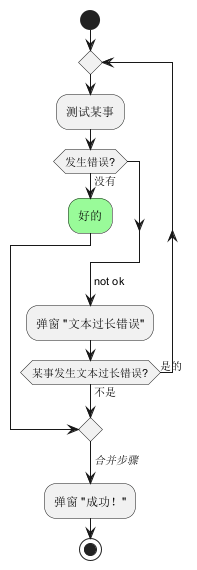
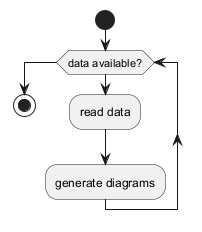
while
可以使用关键字while和end while进行while循环。
1 | @startuml |
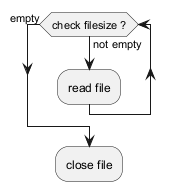
还可以在关键字endwhile后添加标注,还有一种方式是使用关键字is。
1 | @startuml |
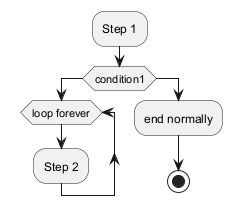
如果你使用 +detach+ 来形成一个无限循环, 那么你可能需要使用 +-[hidden]->+ 来隐藏一些不完整的箭头。
1 | @startuml |
并行
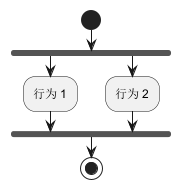
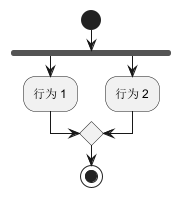
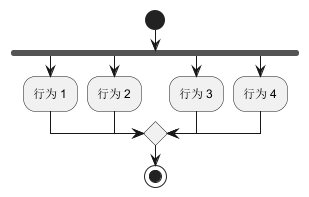
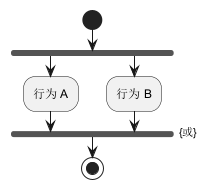
你可以使用fork,fork again和end fork 或者 end merge 等关键字表示并行处理。
fork
1 | @startuml |
fork合并
1 | @startuml |
1 | @startuml |
1 | @startuml |
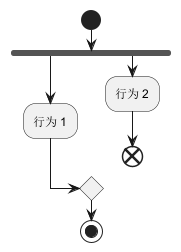
end fork标注
1 | @startuml |
1 | @startuml |

1 | @startuml |

分割
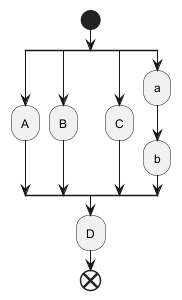
你可以使用 split, split again 和 end split 关键字去表达分割处理
1 | @startuml |
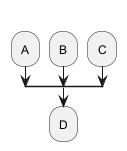
输入分割
你可以使用包含 hidden 指令的箭头去制造一个输入分割 (多入口):
1 | @startuml |
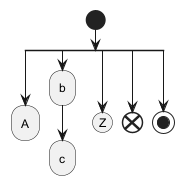
输出分割
1 | @startuml |
注释
文本格式可以使用克里奥尔维基语法。可以使用floating 关键字浮动注释。
1 | @startuml |
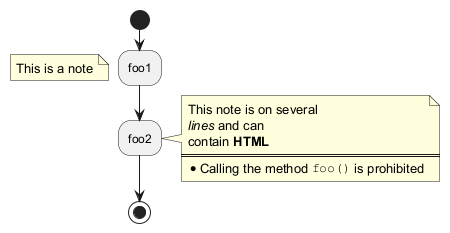
您可以为后向活动添加注释:
1 | @startuml |

可以添加分区活动注释:
1 | @startuml |
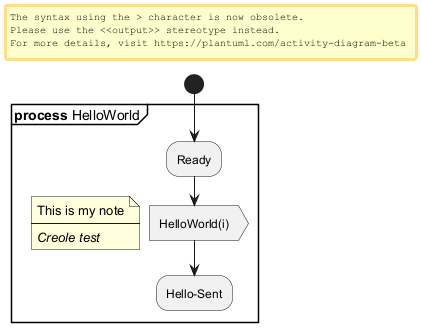
箭头
无箭头连接线
您可以使用 skinparam ArrowHeadColor none 参数来表示仅使用线条连接活动,而不带箭头。
@startuml skinparam ArrowHeadColor none start :Hello world; :This is on defined on several **lines**; stop @enduml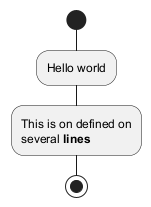 |
@startuml skinparam ArrowHeadColor none start repeat :Enter data; :Submit; backward :Warning; repeat while (Valid?) is (No) not (Yes) stop @enduml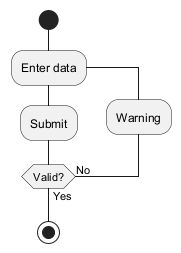 |
箭头
使用->标记,你可以给箭头添加文字或者修改箭头颜色。
同时,你也可以选择点状 (dotted),条状(dashed),加粗或者是隐式箭头
@startuml :foo1; -> You can put text on arrows; if (test) then -[#blue]-> :foo2; -[#green,dashed]-> The text can also be on several lines and **very** long...; :foo3; else -[#black,dotted]-> :foo4; endif -[#gray,bold]-> :foo5; @enduml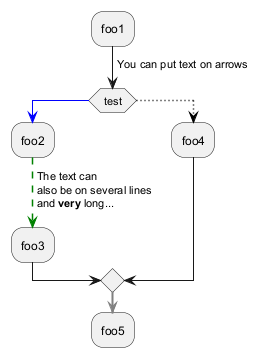 |
Multiple colored arrow
You can use multiple colored arrow.
@startuml skinparam colorArrowSeparationSpace 1 start -[#red;#green;#orange;#blue]-> if(a?)then(yes) -[#red]-> :activity; -[#red]-> if(c?)then(yes) -[#maroon,dashed]-> else(no) -[#red]-> if(b?)then(yes) -[#maroon,dashed]-> else(no) -[#blue,dashed;dotted]-> :do a; -[#red]-> :do b; -[#red]-> endif -[#red;#maroon,dashed]-> endif -[#red;#maroon,dashed]-> elseif(e?)then(yes) -[#green]-> if(c?)then(yes) -[#maroon,dashed]-> else(no) -[#green]-> if(d?)then(yes) -[#maroon,dashed]-> else(no) -[#green]-> :do something; <<continuous>> -[#green]-> endif -[#green;#maroon,dashed]-> partition dummy { :some function; } -[#green;#maroon,dashed]-> endif -[#green;#maroon,dashed]-> elseif(f?)then(yes) -[#orange]-> :activity; <<continuous>> -[#orange]-> else(no) -[#blue,dashed;dotted]-> endif stop @enduml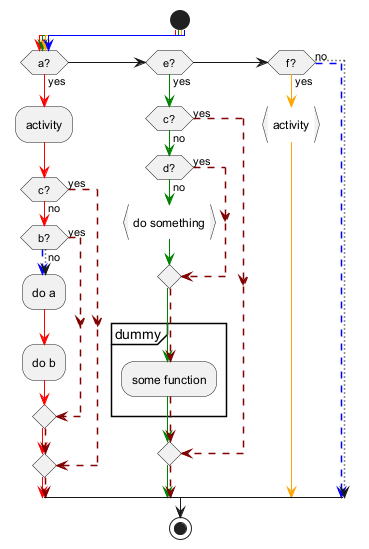 |
[Ref. QA-4411]
连接器(Connector)
你可以使用括号定义连接器。
@startuml start :Some activity; (A) detach (A) :Other activity; @enduml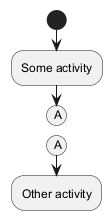 |
WARNING
This translation need to be updated.
WARNING
连接器颜色
你可以在连接器上增加 颜色
@startuml start :下面的连接器 应该是蓝色; #blue:(B) :下一个连接器应该 看起来应该是 深绿色; #green:(G) stop @enduml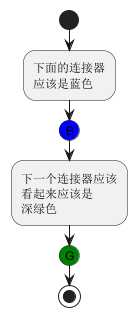 |
[参考. QA-10077]
[Ref. QA-19975]
WARNING
This translation need to be updated.
WARNING
组合(grouping)
通过定义分组(group),你可以把多个活动分组。
@startuml start group 初始化分组 :read config file; :init internal variable; end group group 运行分组 :wait for user interaction; :print information; end group stop @enduml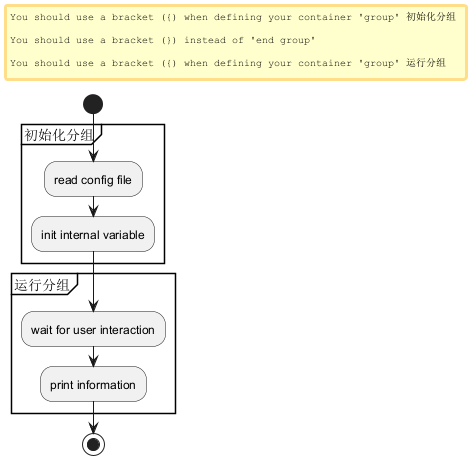 |
分区
通过定义分区(partition),你可以把多个活动组合(group)在一起:
@startuml start partition 初始化分区 { :read config file; :init internal variable; } partition 运行分区 { :wait for user interaction; :print information; } stop @enduml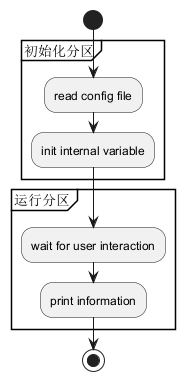 |
这里同样可以改变分区颜色 color:
@startuml start partition #lightGreen "Input Interface" { :read config file; :init internal variable; } partition Running { :wait for user interaction; :print information; } stop @enduml |
[参考: QA-2793]
同样可以添加一个 链接 到分区:
@startuml start partition "[[http://plantuml.com partition_name]]" { :read doc. on [[http://plantuml.com plantuml_website]]; :test diagram; } end @enduml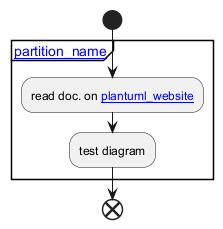 |
[参考: QA-542]
分组, 分区, 包, 矩形 或 卡片式
你可以分组活动通过定义:
- group;
- partition;
- package;
- rectangle;
- card.
@startuml start group 分组 :Activity; end group floating note: 分组备注 partition 分区 { :Activity; } floating note: 分区备注 package 包 { :Activity; } floating note: 包备注 rectangle 矩形 { :Activity; } floating note: 矩形备注 card 卡片式 { :Activity; } floating note: 卡片式备注 end @enduml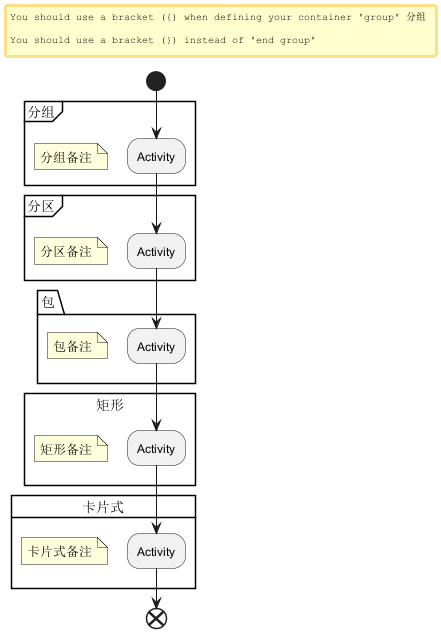 |
泳道(Swimlanes)
你可以使用管道符|来定义泳道。
还可以改变泳道的颜色。
@startuml |Swimlane1| start :foo1; |#AntiqueWhite|Swimlane2| :foo2; :foo3; |Swimlane1| :foo4; |Swimlane2| :foo5; stop @enduml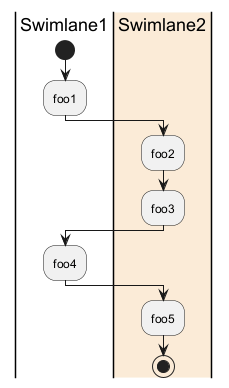 |
你可以在泳道中增加 if 判断或 repeat 或 while 循环.
@startuml |#pink|Actor_For_red| start if (color?) is (red) then #pink:**action red**; :foo1; else (not red) |#lightgray|Actor_For_no_red| #lightgray:**action not red**; :foo2; endif |Next_Actor| #lightblue:foo3; :foo4; |Final_Actor| #palegreen:foo5; stop @enduml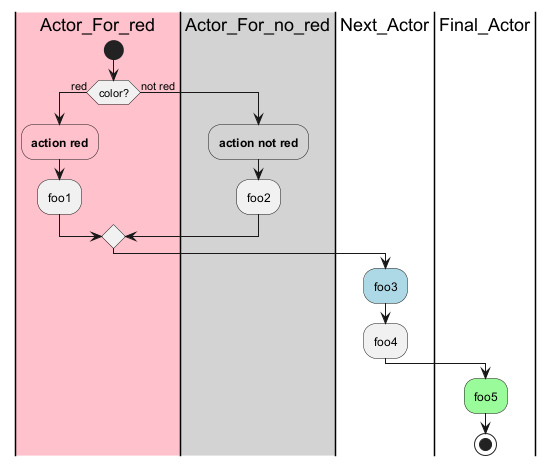 |
你同样可以在泳道中增加别名,使用 alias 语法:
|[#<color>|]<swimlane_alias>| <swimlane_title>
@startuml |#palegreen|f| fisherman |c| cook |#gold|e| eater |f| start :go fish; |c| :fry fish; |e| :eat fish; stop @enduml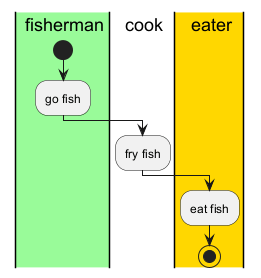 |
[参考: QA-2681]
分离(detach)
可以使用关键字detach 或 kill移除箭头。
detach
@startuml :start; fork :foo1; :foo2; fork again :foo3; detach endfork if (foo4) then :foo5; detach endif :foo6; detach :foo7; stop @enduml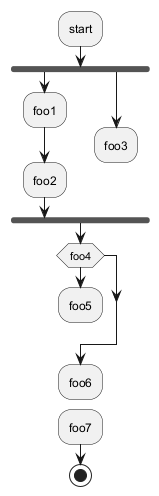 |
kill
@startuml :start; fork :foo1; :foo2; fork again :foo3; kill endfork if (foo4) then :foo5; kill endif :foo6; kill :foo7; stop @enduml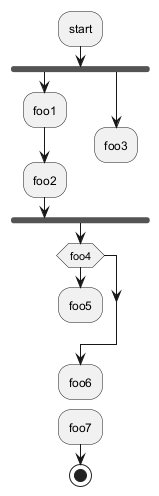 |
SDL(规范和描述语言)
SDL 形状名称表
| 名称 | 旧语法 | 定型语法 |
| 输入 | < |
<<input>> |
| 输出 | > |
<<output>> |
| 程序 | | |
<<procedure>> |
| 加载 | \ |
<<load>> |
| 保存 | / |
<<save>> |
| 连续 | } |
<<continuous>> |
| 任务 | ] |
<<task>> |
SDL using final separator (Deprecated form)
通过更改最终; separator,可以为活动设置不同的渲染:
|<>/\\]}
@startuml :Ready; :next(o)| :Receiving; split :nak(i)< :ack(o)> split again :ack(i)< :next(o) on several lines| :i := i + 1] :ack(o)> split again :err(i)< :nak(o)> split again :foo/ split again :bar\\ split again :i > 5} stop end split :finish; @enduml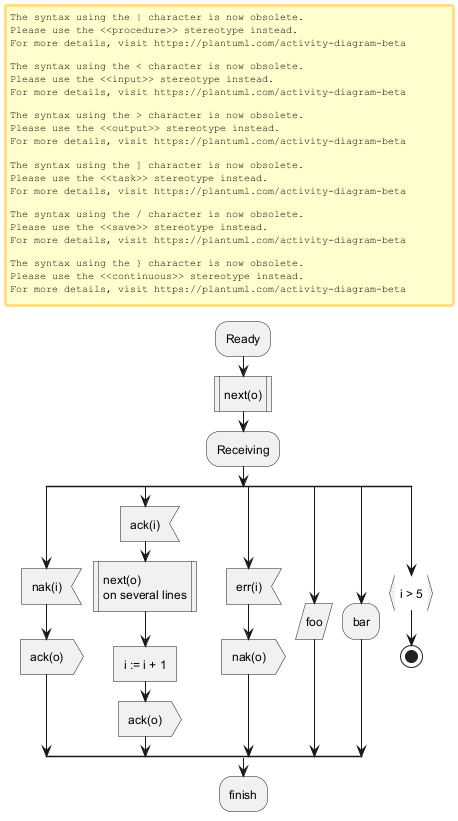 |
使用正态分隔符和立体原型的 SDL(当前正式形式)
@startuml start :SDL Shape; :input; <<input>> :output; <<output>> :procedure; <<procedure>> :load; <<load>> :save; <<save>> :continuous; <<continuous>> :task; <<task>> end @enduml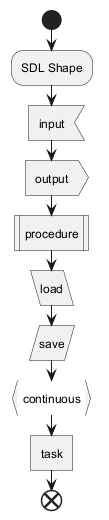 |
@startuml :Ready; :next(o); <<procedure>> :Receiving; split :nak(i); <<input>> :ack(o); <<output>> split again :ack(i); <<input>> :next(o) on several lines; <<procedure>> :i := i + 1; <<task>> :ack(o); <<output>> split again :err(i); <<input>> :nak(o); <<output>> split again :foo; <<save>> split again :bar; <<load>> split again :i > 5; <<continuous>> stop end split :finish; @enduml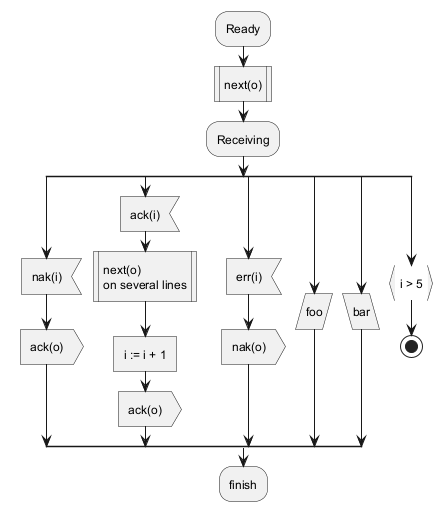 |
WARNING
This translation need to be updated.
WARNING
UML (Unified Modeling Language) Shape
Table of UML Shape Name
| Name | Stereotype syntax |
| ObjectNode | <<object>> |
| ObjectNode typed by signal |
<<objectSignal>> or <<object-signal>> |
| AcceptEventAction without TimeEvent trigger |
<<acceptEvent>> or <<accept-event>> |
| AcceptEventAction with TimeEvent trigger |
<<timeEvent>> or <<time-event>> |
| SendSignalAction SendObjectAction with signal type |
<<sendSignal>> or <<send-signal>> |
| Trigger | <<trigger>> |
[Ref. GH-2185]
UML Shape Example using Stereotype
@startuml :action; :object; <<object>> :ObjectNode typed by signal; <<objectSignal>> :AcceptEventAction without TimeEvent trigger; <<acceptEvent>> :SendSignalAction; <<sendSignal>> :SendObjectAction with signal type; <<sendSignal>> :Trigger; <<trigger>> :\t\t\t\t\t\tAcceptEventAction \t\t\t\t\t\twith TimeEvent trigger; <<timeEvent>> :an action; @enduml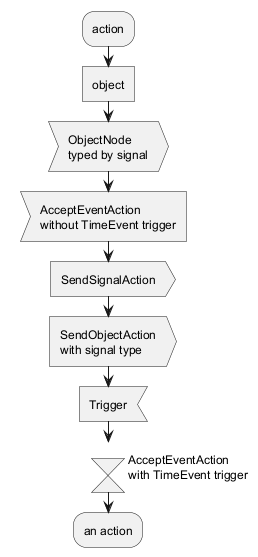 |
[Ref. GH-2185, QA-16558, GH-1659]
一个完整的例子
@startuml start :ClickServlet.handleRequest(); :new page; if (Page.onSecurityCheck) then (true) :Page.onInit(); if (isForward?) then (no) :Process controls; if (continue processing?) then (no) stop endif if (isPost?) then (yes) :Page.onPost(); else (no) :Page.onGet(); endif :Page.onRender(); endif else (false) endif if (do redirect?) then (yes) :redirect process; else if (do forward?) then (yes) :Forward request; else (no) :Render page template; endif endif stop @enduml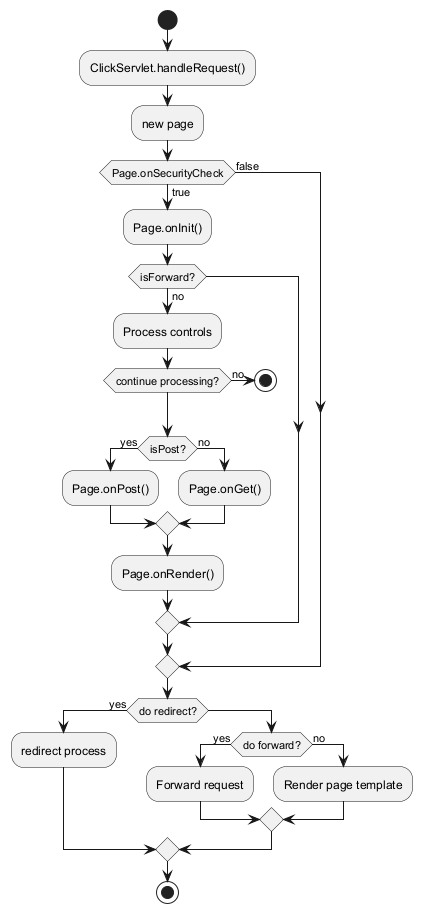 |
判断的样式
inside 样式 (默认)
@startuml skinparam conditionStyle inside start repeat :act1; :act2; repeatwhile (<b>end) :act3; @enduml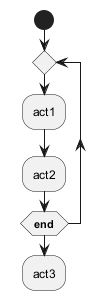 |
@startuml start repeat :act1; :act2; repeatwhile (<b>end) :act3; @enduml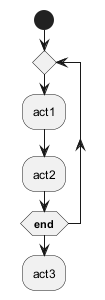 |
Diamond 样式
@startuml skinparam conditionStyle diamond start repeat :act1; :act2; repeatwhile (<b>end) :act3; @enduml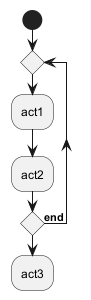 |
InsideDiamond (或 Foo1) 样式
@startuml skinparam conditionStyle InsideDiamond start repeat :act1; :act2; repeatwhile (<b>end) :act3; @enduml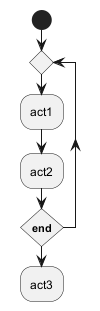 |
@startuml skinparam conditionStyle foo1 start repeat :act1; :act2; repeatwhile (<b>end) :act3; @enduml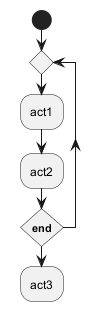 |
判断的结束样式
Diamond 样式 (默认)
- With one branch
@startuml skinparam ConditionEndStyle diamond :A; if (decision) then (yes) :B1; else (no) endif :C; @enduml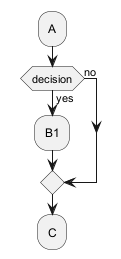 |
- 两个分支 (
B1,B2)
@startuml skinparam ConditionEndStyle diamond :A; if (decision) then (yes) :B1; else (no) :B2; endif :C; @enduml @enduml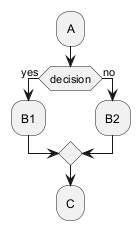 |
水平线 (hline) 样式
- 一个分
@startuml skinparam ConditionEndStyle hline :A; if (decision) then (yes) :B1; else (no) endif :C; @enduml |
- 两个分支 (
B1,B2)
@startuml skinparam ConditionEndStyle hline :A; if (decision) then (yes) :B1; else (no) :B2; endif :C; @enduml @enduml |
[Ref. QA-4015]
使用 sytle 定义 (全局) 样式
无样式 (默认)
@startuml start :init; -> test of color; if (color?) is (<color:red>red) then :print red; else :print not red; note right: no color endif partition End { :end; } -> this is the end; end @enduml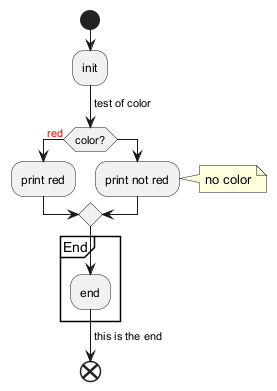 |
有样式
你可以使用 style 节点去定义样式然后改变渲染。
@startuml <style> activityDiagram { BackgroundColor #33668E BorderColor #33668E FontColor #888 FontName arial diamond { BackgroundColor #ccf LineColor #00FF00 FontColor green FontName arial FontSize 15 } arrow { FontColor gold FontName arial FontSize 15 } partition { LineColor red FontColor green RoundCorner 10 BackgroundColor PeachPuff } note { FontColor Blue LineColor Navy BackgroundColor #ccf } } document { BackgroundColor transparent } </style> start :init; -> test of color; if (color?) is (<color:red>red) then :print red; else :print not red; note right: no color endif partition End { :end; } -> this is the end; end @enduml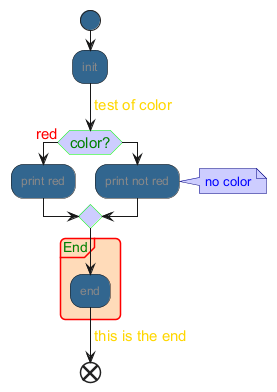 |
Emoji as action
You can use emoji as action, with the stereotype <<icon>>:
@startuml while (<:cloud_with_rain:>) :<:umbrella:>; <<icon>> endwhile -<<icon>><:closed_umbrella:> @enduml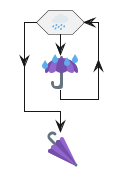 |